
A regex will happily accept ana.souza@gmial.com. So will your database, your CRM and your welcome email sequence, until the first bounce. An email validation API catches that address while the person is still on your signup page, which is the only moment you can ask them to fix it.
This post shows how to call the Easy Email Verification API from your signup code in Python, PHP and JavaScript, using results from a real test. Most of it is about the part tutorials skip: what your code should do with each answer, and what it should do when the API doesn’t answer at all.
Table of Contents
What an email validation API checks that regex can’t
Format checks only tell you the address looks like an address. The Easy Email Verification API goes further: it checks that the domain exists and has a mail server, talks to that server to ask whether the mailbox exists, and flags addresses from disposable providers, role addresses such as support@ and domains that accept everything (catch-all).
You can try it right now, with no account, using the public sandbox key:
curl --get "https://api.easyemailverification.com/v1/verify" \
  --data-urlencode "email=valid@sandbox.easyemailverification.com" \
  -H "X-API-Key: eev_sandbox_key"
With your own key, the request is the same. Send the key in the X-API-Key header rather than in the URL: URLs end up in server logs, proxies and error trackers; headers usually don’t.
A real test: four signups, four different answers
On November 20 we sent five addresses through the API, the kind of mix any signup form receives in a week. Four of them are below. The fifth belongs to a real company, so we left it out. The full JSON responses are kept with this post.
| Address | result | reason | Signals | did_you_mean |
|---|---|---|---|---|
| support@easyemailverification.com | valid | accepted_email | role | none |
| x9k.eev.nobody.2026@gmail.com | invalid | rejected_email | free | none |
| ana.souza.eev2026@gmial.com | invalid | invalid_mx_record | disposable | ana.souza.eev2026@gmail.com |
| eev.signup.test2026@mailinator.com | unknown | accept_all | disposable, free | none |
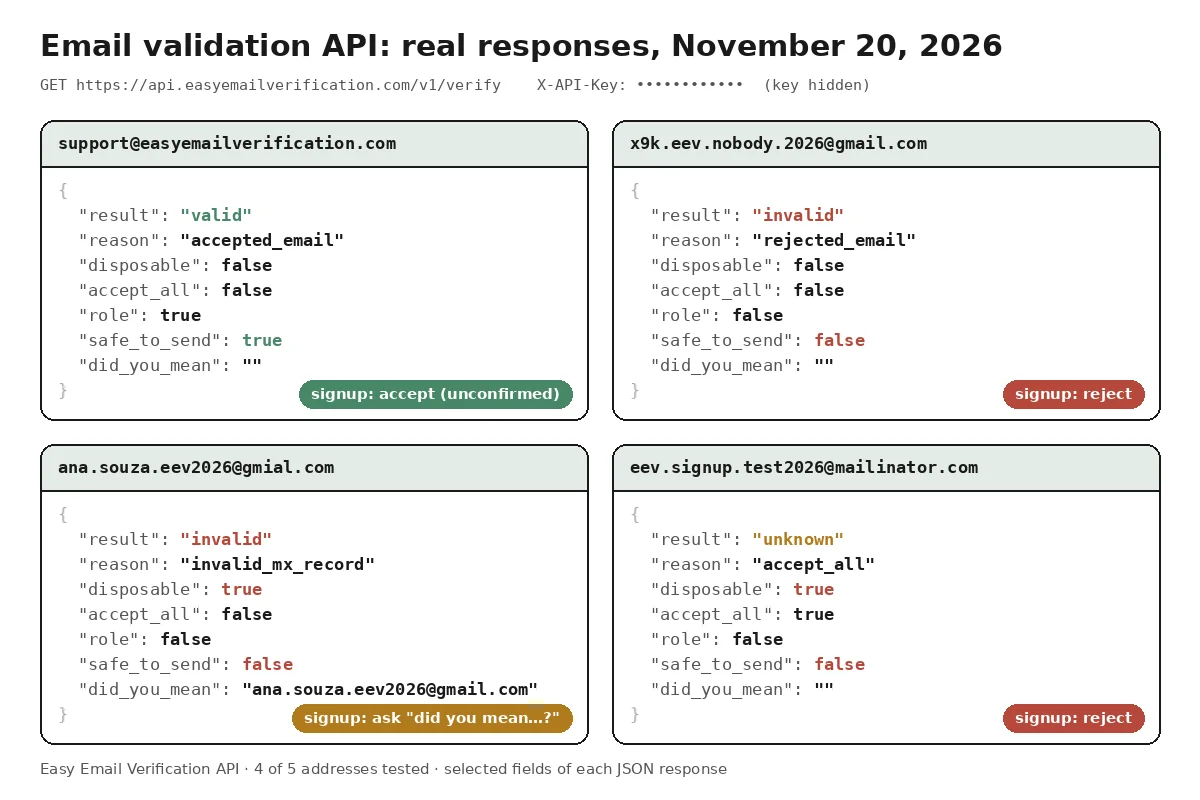
Two of these deserve a closer look.
The Gmail typo comes back invalid, with the corrected address in did_you_mean. Rejecting it outright would lose a real person who mistyped one letter. Asking “Did you mean gmail.com?” keeps them. The suggestion is a question, though, not an approval: if the person accepts it, the corrected address goes through the API again; if they insist on gmial.com, it’s still invalid.
The Mailinator address is the trap. Mailinator accepts mail for any mailbox, so the result is unknown with reason accept_all, not invalid. If your code only reads result, a throwaway inbox walks straight into your user base. The disposable flag is what catches it.
Validating is not confirming
An email validation API tells you whether a mailbox is likely to exist. It can’t tell you that the person filling in the form owns it. Only a confirmation link does that.
So treat the two as separate steps. Validation decides whether to let the signup continue. Confirmation decides whether the address is trusted: until the link is clicked, the account exists but the email is unconfirmed, and it shouldn’t go into your marketing campaigns yet.
What to do with each result at signup
This is the policy we use and recommend for a normal signup form. Adjust it to your risk, but decide it on purpose; don’t let it be whatever the first version of the code happened to do.
| API answer | Action | What the user sees |
|---|---|---|
| did_you_mean is filled | Ask first | “Did you mean ana.souza@gmail.com?” The chosen address is checked again |
| disposable is true | Reject | “Please use a permanent email address” |
| invalid | Reject | “This address doesn’t seem to exist. Please check it” |
| valid | Accept, unconfirmed | Signup continues; confirmation link sent |
| unknown | Accept, unconfirmed | Signup continues; confirmation link sent |
| API slow, down or out of credits | Accept, unconfirmed, verify later | Nothing different |
Our opinion on unknown: don’t block it at signup. Catch-all company domains, servers that are slow to answer and providers that temporarily refuse verification all land there, and many of those are real customers. But accepting a signup is not the same as trusting the address. For unknown, the API returns safe_to_send: false because it couldn’t confirm the mailbox exists, and letting the person sign up doesn’t change that result. Keep the address out of campaigns until the person confirms it and your own sending policy allows it.
In other words, you have two policies, not one. The signup policy (the table above) decides who gets an account. The sending policy decides who gets your campaigns, and that’s where safe_to_send belongs.
Role addresses (support@, sales@) are a signal, not a verdict. For a B2C newsletter you might reject them; for a B2B tool, contact@ is often the only address a small company has.
The short way: official libraries
If you’d rather not write the HTTP call, there are official libraries for Node.js, Python and PHP (npm install easyemailverification, pip install easyemailverification, composer require easyemailverification/php-sdk). Each one reads the key from EEV_API_KEY and has a decide() helper that turns a result into accept, reject, suggest or review. Details are on the libraries page.
The examples below use plain HTTP instead, so you can see every decision and adapt it. They return the action plus any suggestion. Timeouts, network errors, HTTP error codes and responses that aren’t the JSON they expect all become pending instead of an exception.
Email validation API in Python
Uses the requests library and the standard logging module.
import logging
import os

import requests

API_URL = "https://api.easyemailverification.com/v1/verify"
API_KEY = os.environ["EEV_API_KEY"]  # never hard-code the key
log = logging.getLogger("signup")


def check_signup_email(email):
    """Returns {"action": "accept" | "reject" | "pending", "suggestion": str | None}."""
    domain = email.rpartition("@")[2]  # log the domain, never the full address
    try:
        resp = requests.get(
            API_URL,
            params={"email": email},
            headers={"X-API-Key": API_KEY},
            timeout=10,
        )
    except requests.RequestException as exc:
        log.warning("EEV unreachable (%s), domain=%s", type(exc).__name__, domain)
        return {"action": "pending", "suggestion": None}

    if resp.status_code != 200:
        level = logging.ERROR if resp.status_code in (400, 401, 402) else logging.WARNING
        log.log(level, "EEV HTTP %s, domain=%s", resp.status_code, domain)
        return {"action": "pending", "suggestion": None}

    try:
        r = resp.json()
        result = r["result"]
    except (ValueError, KeyError, TypeError):
        log.error("EEV unexpected response, domain=%s", domain)
        return {"action": "pending", "suggestion": None}

    suggestion = r.get("did_you_mean") or None
    if r.get("disposable") or result == "invalid":
        action = "reject"
    elif result in ("valid", "unknown"):
        action = "accept"  # the address is still unconfirmed
    else:
        log.error("EEV unexpected result %r, domain=%s", result, domain)
        action = "pending"
    return {"action": action, "suggestion": suggestion}
With the four addresses from the test, it returns accept, reject, reject with the gmail.com suggestion, and reject.
PHP example with cURL
No library needed, only the cURL extension that ships with almost every PHP install.
<?php
const API_URL = 'https://api.easyemailverification.com/v1/verify';

/** Returns ['action' => 'accept'|'reject'|'pending', 'suggestion' => ?string] */
function check_signup_email(string $email): array
{
    $domain = substr(strrchr($email, '@') ?: '', 1); // log the domain, never the full address
    $ch = curl_init(API_URL . '?' . http_build_query(['email' => $email]));
    curl_setopt_array($ch, [
        CURLOPT_RETURNTRANSFER => true,
        CURLOPT_HTTPHEADER     => ['X-API-Key: ' . getenv('EEV_API_KEY')],
        CURLOPT_TIMEOUT        => 10,
    ]);
    $body   = curl_exec($ch);
    $status = curl_getinfo($ch, CURLINFO_HTTP_CODE);
    curl_close($ch);

    if ($body === false || $status !== 200) {
        // 0 = timeout or network error; 400, 401 and 402 need a person to act
        error_log("EEV HTTP $status, domain=$domain");
        return ['action' => 'pending', 'suggestion' => null];
    }

    $r = json_decode($body, true);
    if (!is_array($r) || !isset($r['result'])) {
        error_log("EEV unexpected response, domain=$domain");
        return ['action' => 'pending', 'suggestion' => null];
    }

    $suggestion = $r['did_you_mean'] ?? '' ?: null;
    if (!empty($r['disposable']) || $r['result'] === 'invalid') {
        return ['action' => 'reject', 'suggestion' => $suggestion];
    }
    if (in_array($r['result'], ['valid', 'unknown'], true)) {
        return ['action' => 'accept', 'suggestion' => $suggestion]; // still unconfirmed
    }
    error_log("EEV unexpected result, domain=$domain");
    return ['action' => 'pending', 'suggestion' => null];
}
JavaScript (Node.js) example
Node 18 and later have fetch built in. This runs on your server, never in the page.
const API_URL = "https://api.easyemailverification.com/v1/verify";
const API_KEY = process.env.EEV_API_KEY; // server side only, never in the browser

// Returns { action: "accept" | "reject" | "pending", suggestion: string | null }
export async function checkSignupEmail(email) {
  const domain = email.split("@").pop(); // log the domain, never the full address
  const url = new URL(API_URL);
  url.searchParams.set("email", email);

  let r;
  try {
    const resp = await fetch(url, {
      headers: { "X-API-Key": API_KEY },
      signal: AbortSignal.timeout(10000),
    });
    if (!resp.ok) {
      const log = [400, 401, 402].includes(resp.status) ? console.error : console.warn;
      log(`EEV HTTP ${resp.status}, domain=${domain}`);
      return { action: "pending", suggestion: null };
    }
    r = await resp.json();
  } catch (err) {
    // timeout, network error or a body that isn't JSON
    console.warn(`EEV failed (${err.name}), domain=${domain}`);
    return { action: "pending", suggestion: null };
  }

  const suggestion = r?.did_you_mean || null;
  if (r?.disposable || r?.result === "invalid") return { action: "reject", suggestion };
  if (r?.result === "valid" || r?.result === "unknown") {
    return { action: "accept", suggestion }; // the address is still unconfirmed
  }
  console.error(`EEV unexpected response, domain=${domain}`);
  return { action: "pending", suggestion: null };
}
Wiring it into the signup route
The function only decides. Your signup route is where the user sees the result. Here’s a minimal Express route that uses the Node.js function above; the same order works in Flask, Laravel or anything else.
The route shows the decision flow, not a complete signup. createUser() and sendConfirmationLink() at the end are simulations: nothing is saved and no email is sent. Replace them with your own database and mailer before using it in production.
import express from "express";
import { checkSignupEmail } from "./signup_check.mjs";

const app = express();
app.use(express.json());

app.post("/signup", async (req, res) => {
  const email = String(req.body.email ?? "").trim();

  // 0. Cheap local check first: don't spend a credit on an empty or broken field.
  if (!/^[^\s@]+@[^\s@]+\.[^\s@]+$/.test(email) || email.length > 254) {
    return res.status(422).json({ error: "Please enter a valid email address." });
  }

  const { action, suggestion } = await checkSignupEmail(email);

  // 1. A likely typo: ask first. If the user takes the suggestion,
  //    the form sends the corrected address and it is checked again.
  if (suggestion && !req.body.keepTypedEmail) {
    return res.status(409).json({ suggestion });
  }
  // 2. Invalid or disposable, even if the user insisted on what they typed.
  if (action === "reject") {
    return res.status(422).json({ error: "Please use a valid, permanent email address." });
  }
  // 3. accept or pending: create the account with the email still unconfirmed.
  try {
    const user = await createUser(email, { emailConfirmed: false, recheck: action === "pending" });
    await sendConfirmationLink(user);
    res.status(201).json({ id: user.id });
  } catch (err) {
    console.error(`signup failed after verification: ${err.name}`);
    res.status(500).json({ error: "We couldn't create your account. Please try again." });
  }
});

// SIMULATED: nothing is saved and no email is sent.
// Replace these two with your own database and mailer before using this in production.
async function createUser(email, flags) { return { id: Date.now(), email, ...flags }; }
async function sendConfirmationLink(user) {}

app.listen(3000);
The order matters. A local format check runs first, so an empty or broken field never costs a credit. The suggestion comes next, so a typo gets a friendly question instead of an error, and the reject check comes after it, so insisting on gmial.com doesn’t get the address in. If saving the account fails after a successful check, the user gets a plain error and can try again.
Never call the API from the browser
It’s tempting to verify on the email field’s blur event, straight from the page. Don’t do it with your API key: anyone can open the browser’s developer tools, copy the key and spend your credits. Call your own backend, and let the backend call the API.
If you really want verification inside the form without writing backend code, use the form widget. It has its own key, which only works on your authorized domain and is limited per visitor.
When the API doesn’t answer
A verification talks to someone else’s mail server, so it can take a few seconds, and occasionally that server doesn’t reply. The API documentation recommends a timeout of about 30 seconds. For a signup form we use 10: nobody waits 30 seconds on a “Create account” button.
When the call fails, the examples return pending and let the user in with an unconfirmed email. A lost signup costs more than an occasional bad address, and you can verify the pending ones later in a daily bulk email verification job. Not every failure is the same, though:
| What happened | What it means | What to do |
|---|---|---|
| Timeout, network error, 5xx | Temporary | Verify later, with backoff, a few times at most |
| 429 | Too many requests | Slow down; verify later |
| 400 or 401 | Your request or key is wrong | Fix the configuration; nothing is being verified |
| 402 | Out of credits | Alert whoever pays the bill; don’t retry |
| 200 with a body you can’t read | Unexpected | Log it and treat as pending |
That’s why the examples log at error level for 400, 401 and 402: if a key is revoked, every signup quietly becomes pending, and only the log will tell you. Log the domain, not the full address, and never the key.
One more thing about retries: a request that timed out may already have used a credit. Don’t retry in a tight loop.
Test without spending credits
The sandbox key eev_sandbox_key works without an account. Addresses at sandbox.easyemailverification.com return fixed answers: valid@, invalid@, unknown@, disposable@, catchall@ and role@ cover each case, typo@gmial.com returns a did_you_mean suggestion, and quota@ and ratelimit@ return the 402 and 429 errors so you can test the failure path too. We ran the three examples above against all nine: same answers in Python, PHP and Node.js, with catchall@ and unknown@ accepted as unconfirmed, disposable@ rejected and the 402 and 429 errors logged as pending. The full list of fields and errors is in the API documentation.
Frequently asked questions
How much does each verification cost?
One credit per address, and a new account starts with 200 free credits. Answers that are unknown because of a timeout, an error or a block aren’t charged; catch-all answers are. Prices are on the API page.
Can I validate several addresses in one request?
Yes. A POST to the same /v1/verify endpoint accepts up to 50 addresses. For lists of thousands, use the bulk upload instead.
Should I validate on every keystroke?
No. Validate once, when the form is submitted, on your server. Each call uses a credit and talks to a mail server, so validating half-typed addresses wastes both.
Next step
Run the curl command above with the sandbox key, then plug one of the examples into your signup route. When you’re ready for real addresses, create a free account and generate a key under API settings. To see the full response for a single address before writing any code, try the free email checker.
Related posts
- Email verification results: what valid, invalid, catch-all and unknown mean
- How to clean a 50,000-contact email list before a campaign
- ActiveCampaign email verification: check contacts automatically
See all posts on the Easy Email Verification blog
Illustration by Storyset