
Home / DMARC Monitor
DMARC Monitor: understand your reports and protect your domain
See who is sending email as your domain, which messages fail authentication and what to fix, without having to read raw XML reports.
Add your domain, publish one DNS record and start receiving reports.
What is DMARC?
DMARC (Domain-based Message Authentication, Reporting and Conformance) is a DNS record that tells mailbox providers what to do with email that claims to come from your domain but fails authentication. It builds on SPF and DKIM, and it also sends you reports showing how your domain is being used.
SPF
Lists the servers allowed to send email for your domain.
DKIM
Adds a digital signature showing that the message was authorized and not altered.
DMARC
Checks that SPF or DKIM match the visible From domain, applies your policy and sends you reports.
How DMARC monitoring works
Providers send DMARC reports as technical XML files. The monitor receives them for you and turns them into information you can act on.
Add your domain
Enter the domain and get the reporting addresses to use in its DMARC record.
Publish the DNS record
Add the record at your DNS provider. If you already have a DMARC record, only add the reporting addresses to it.
Read the reports
As providers send reports, follow compliance over time and investigate what fails.
See it in the dashboard
Reports per domain: compliance rate, daily volume and the providers that sent reports. Sample data.
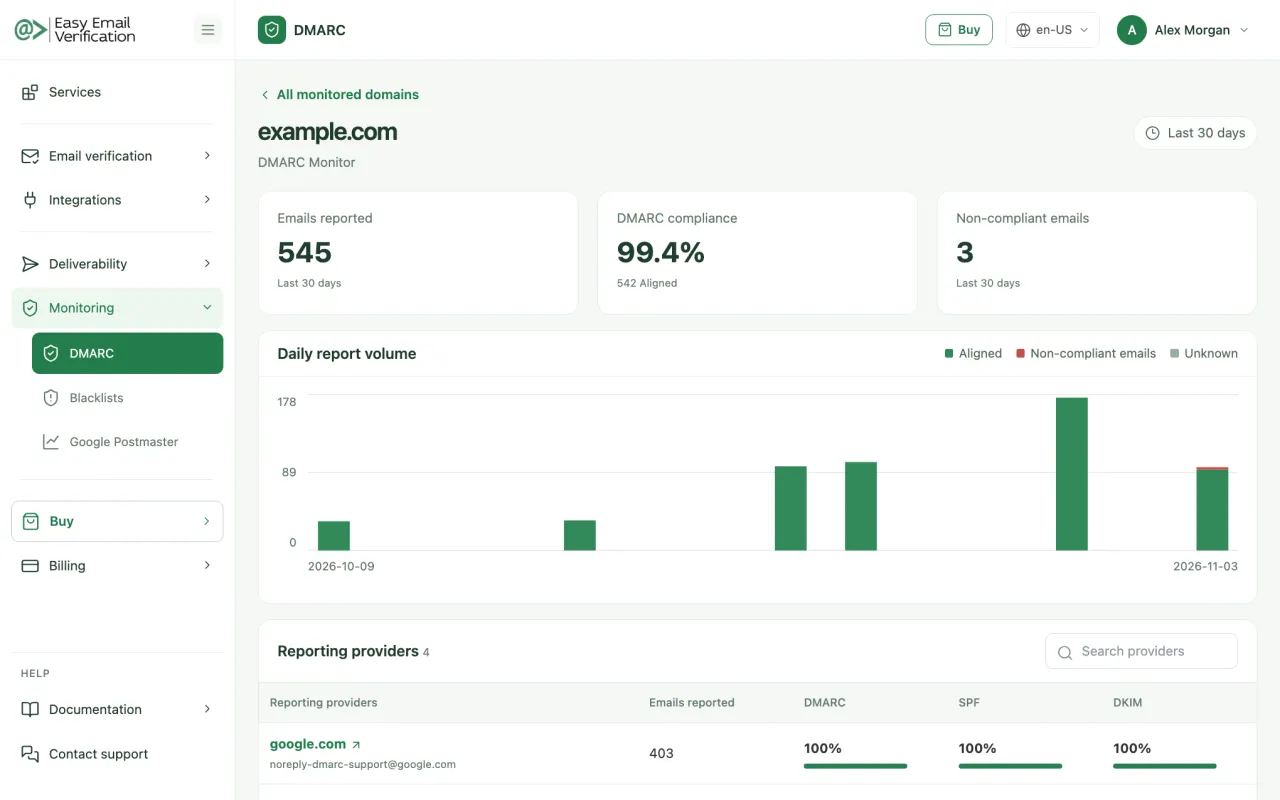
What you see in the DMARC Monitor
All domains in one place
Follow status, reported emails and compliance for each monitored domain.
Authentication over time
See how compliance changes and spot drops after a new tool or configuration.
Unauthorized senders
Identify the sources sending email as your domain, including those you do not recognize.
Non-compliant emails
See how many messages failed and start investigating from the right place.
Reports by provider
Open the details reported by each organization that sent you a report.
Guided setup
Get the DNS record ready to copy, with guidance for domains that already use DMARC.
Watch: DMARC explained

In this video, you will see how DMARC helps to:
- improve email deliverability
- protect your sender reputation
- keep legitimate messages out of spam
Prefer to listen? Hear it on Spotify
From p=none to p=reject: how to adopt DMARC safely
Do not start by blocking email. Begin by monitoring, fix what fails, and only then tighten the policy.
| Policy | What happens to failing email | When to use it |
|---|---|---|
| p=none | Delivered normally; you only receive reports. | At the start, to discover everything that sends as your domain. |
| p=quarantine | Providers tend to treat it as suspicious, usually sending it to spam. | When your legitimate sources already pass authentication. |
| p=reject | Providers may refuse the message. | When reports show that legitimate email consistently passes. |
Deliverability Tools
Choose the best plan that fits your needs.
Basic
$49 / month
- 50 Email Scoring per month
- 50 Inbox Placement Tests per month
- 10 Blacklist Monitors per month (scanned every 12 hrs)
- 2 DMARC Monitor Domains per month
- 1 Google Postmaster Domain
- 50 Inbox Warm-up interactions per day
Advanced
$99 / month
- 100 Email Scoring per month
- 100 Inbox Placement Tests per month
- 20 Blacklist Monitors per month (scanned every 10 hrs)
- 5 DMARC Monitor Domains per month
- 3 Google Postmaster Domains
- 250 Inbox Warm-up interactions per day
Premium
$249 / month
- 500 Email Scoring per month
- 500 Inbox Placement Tests per month
- 50 Blacklist Monitors per month (scanned every 8 hrs)
- 20 DMARC Monitor Domains per month
- 10 Google Postmaster Domains
- 750 Inbox Warm-up interactions per day
Enterprise
$499 / month
- 1,500 Email Scoring per month
- 1,500 Inbox Placement Tests per month
- 250 Blacklist Monitors per month (scanned every 4 hrs)
- 250 DMARC Monitor Domains per month
- 50 Google Postmaster Domains
- 2,500 Inbox Warm-up interactions per day
DMARC Monitor FAQ
-
Do I need DMARC?
If you send email from your own domain, yes. It protects the domain from impersonation, and Gmail and Yahoo require a DMARC record from bulk senders.
-
Does DMARC improve deliverability?
It helps providers trust that your email is authentic, which supports deliverability. It does not guarantee the inbox, because reputation, content and engagement also count.
-
Why have I not received any reports yet?
Reports only arrive after the DNS record is published and providers send them, usually once a day. Adding a domain to the monitor does not verify or change your DNS.
-
I already have a DMARC record. Should I create another one?
No. A domain must have a single DMARC record. Add the reporting addresses to the existing record and keep your current policy.
-
Will monitoring block any of my email?
No. Monitoring only reads reports. What providers do with failing email depends on the policy in your record, and p=none does not ask them to block anything.
-
Which plans include the DMARC Monitor?
All deliverability plans. The number of monitored domains depends on the plan.
Related services
See who is sending email as your domain
Add your domain and start following your DMARC reports.
Start monitoring