Monday, 9:12. A customer forwards you a bounce: “554 5.7.1 Service unavailable; Client host [203.0.113.10] blocked using zen.spamhaus.org”. Ten minutes later, a free checker says your domain is on four blocklists. Someone suggests buying a new domain before lunch. (The scenario is illustrative; 203.0.113.10 is an address reserved for documentation.)
Wait. A blocklist warning doesn’t always mean your domain is listed, and a confirmed listing rarely calls for a new domain. The first 24 hours are for three things: confirming what is really listed, containing the cause, and starting the right removal process. How long the removal itself takes depends on the list, and nobody can promise you a date.
The short answer, if you only read one paragraph: check the listing on the list’s own site, read the bounce to see whether an IP or a domain was blocked, pause only the sending that caused it, fix the cause, and then request removal through each list’s official process.
We start with a test, because the first thing that can mislead you is the checker itself.
Table of Contents
Hour 0: is your domain blacklisted, or did the lookup fail?
Blocklists (many people still call them blacklists; technically, DNSBLs) are queried over DNS. Several of the big ones refuse queries that arrive through large shared resolvers such as Google’s 8.8.8.8 or Cloudflare’s 1.1.1.1, and many free checkers run on exactly those.
How we tested. On November 22, 2026, between 18:28 and 18:49 UTC, we queried six lists through the public DNS-over-HTTPS endpoints of Cloudflare and Google. There were 13 queries per list and resolver: one at 18:28, two at 18:48 and ten in a row at 18:49. We used the test entry each service documents as permanently listed, so a working lookup must answer “listed” (for dbltest.com, Spamhaus documents the answer as 127.0.1.2). This loop runs one round of the queries, all six lists through both resolvers. Run it again to repeat the measurement and compare the codes:
for q in 2.0.0.127.zen.spamhaus.org dbltest.com.dbl.spamhaus.org \
         test.uribl.com.multi.uribl.com 2.0.0.127.b.barracudacentral.org \
         2.0.0.127.bl.spamcop.net 2.0.0.127.psbl.surriel.com; do
  for r in https://cloudflare-dns.com/dns-query https://dns.google/resolve; do
    echo "$q via $r"
    curl -s -H "accept: application/dns-json" "$r?name=$q&type=A"; echo
  done
done| List | Cloudflare answer | Google answer | What it means |
|---|---|---|---|
| Spamhaus DBL (domains) | 127.255.255.254, every time | not found, every time | No usable answer from either |
| Spamhaus ZEN (IPs) | 127.255.255.254, every time | not found at 18:28, listed in the 12 later queries | Unreliable through public DNS |
| URIBL (domains) | 127.0.0.1 (“refused”), every time | 127.0.0.1, every time | No usable answer |
| Barracuda, SpamCop, PSBL (IPs) | listed | listed | Lookup worked |
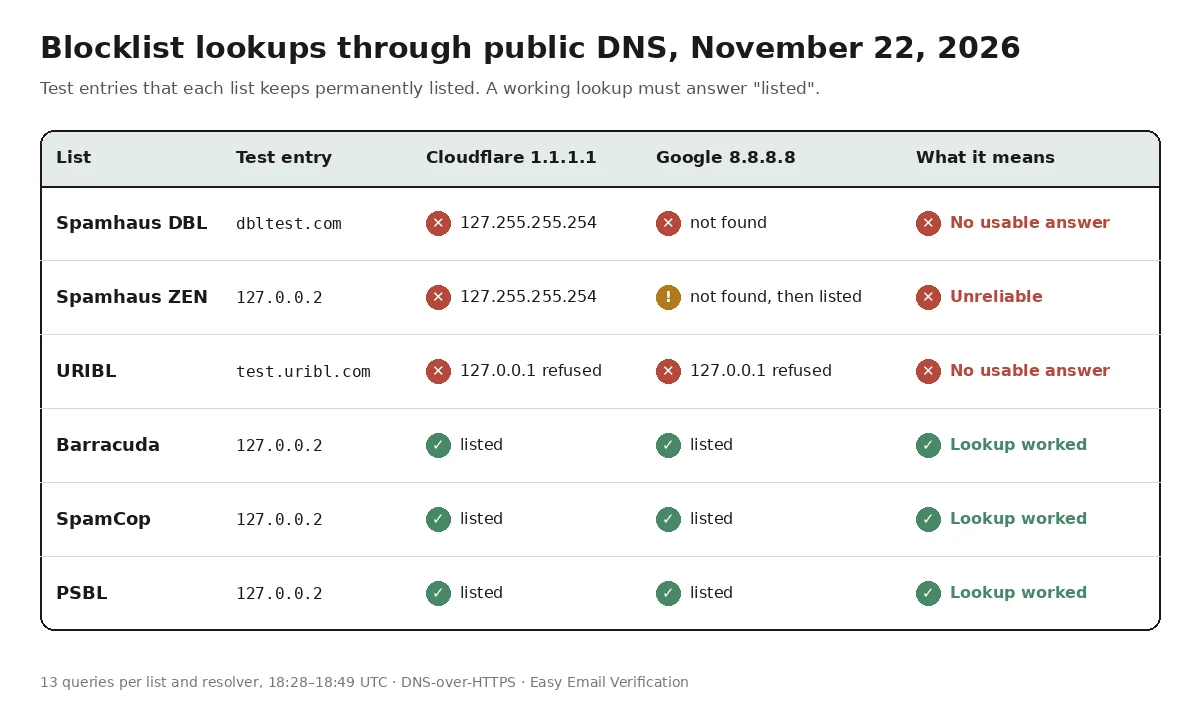
These are observations from one place on one afternoon, not a ranking of resolvers. We keep the raw answers on file. They still show three different situations a checker has to tell apart.
- Refused. Spamhaus answers blocked queries with 127.255.255.254, which it documents as a query via a public or open resolver, with no reputation data. URIBL uses 127.0.0.1 for the same purpose, as its own page explains. A tool that reads any 127.x answer as “listed” shows you listings that don’t exist.
- No valid answer. Google said “not found” for Spamhaus’s DBL test entry, which is listed by design. A green “not listed” from that path says nothing.
- Listed. Only a code from the list’s documented listing range means a real listing.
Our rule: before you trust a checker, ask it about the test entry of the list you care about (dbltest.com for Spamhaus DBL; for IP lists, the test entry and expected code each list documents). If it says dbltest.com is clean, ignore what it says about your domain on the DBL. For Spamhaus, the answer that counts is check.spamhaus.org, which is also where DBL removals are handled.
Hour 1: read the bounce and find which domain or IP was blocked
The rejection text usually names the list. Collect three or four bounces from different recipients. One rejection can be a single company’s firewall. If several receivers name the same list, treat it as a priority, but still confirm the listing on the list’s own site: receivers can make the same lookup mistake we showed above.
Then work out what was checked:
- An IP list (Spamhaus SBL, XBL, CSS, Barracuda, SpamCop): the listed item is a sending server. On a shared email platform, other customers may have caused it, and the platform is who can act. Open a ticket with the exact bounce text.
- A domain list (Spamhaus DBL, URIBL, SURBL): a message carries several domains. The From address, the return path, the DKIM signature, the server’s HELO name and every link in the body. Domain lists can match domains found in URLs and in message headers, so find which one is listed. If it’s your own sending domain, the listing follows it to any platform whose receivers check that list. If it’s a link shortener or a partner’s domain, removing that link may be the whole fix.
- No list named, just “blocked” or “policy”: that’s usually the receiving provider’s own filtering. Gmail and Microsoft run their own reputation systems; Google Postmaster Tools and Microsoft SNDS are where to look, along with your sending logs and the SMTP code. An inbox placement test is useful later, for mail that is being accepted but lands in spam. It doesn’t diagnose a rejection.
Also check whether the listing matters. Postmark notes that MXToolbox checks about 100 lists and that, in its view, about 95% of them can safely be ignored. The reverse is also true: being clean on every public list doesn’t guarantee that Gmail or Microsoft will accept your mail or put it in the inbox.
Hours 1 to 4: stop the stream that caused it
Pause the campaign or automation that was running when the bounces started. Keep transactional mail flowing if it goes out through a different server or subdomain, knowing that receivers may still weigh your main domain’s reputation. If everything shares the same IP and domain, pause marketing entirely until you know the cause. Another large batch while listed means more spam-trap hits and complaints, and that can lead to listings on other lists.
Hours 4 to 12: find the cause
A removal request without a fix is a request to be relisted. These are the causes worth investigating, depending on what was listed and how you send:
- An old or bought list. Abandoned addresses can be turned into spam traps. Look at the last import before the bounces started.
- A signup form being abused. Bots fill the form with random or trap addresses, and your system mails each one a confirmation.
- A compromised account. A leaked SMTP password or a hacked site sending as you. Contain it first: change the credentials, disable the account or plugin, and check the logs for volume you don’t recognize.
- Someone spoofing your domain. Mail you never sent can carry your domain. Your DMARC aggregate reports show which servers send as you and which messages fail authentication. Once every legitimate source is authenticated and aligned, a quarantine or reject policy asks receivers to treat the forgeries as suspicious or refuse them.
For causes 1 and 2, the fix is in the list and the form: verify the list before the next send, drop what comes back invalid, and add real-time verification to the form. Verification identifies invalid addresses so you can remove them. It can’t prove consent or detect every spam trap, so a list nobody opted into stays a problem after it’s verified. To check SPF, DKIM and DMARC for any domain, our free domain report shows all three in a few seconds.
Hours 12 to 24: start each list’s removal process
Each list has its own process, and no third party can speed it up. Spamhaus says so explicitly. Even within Spamhaus, each list works differently, so read what the checker says about your specific listing.
| List | How removal works | What to expect |
|---|---|---|
| Spamhaus DBL, XBL, CSS | Request it at check.spamhaus.org, after the fix | The checker shows the reason and the path for that listing |
| Spamhaus PBL | Also at check.spamhaus.org | Not a spam listing: it marks addresses that shouldn’t send mail directly |
| Spamhaus SBL | Your ISP or hosting provider asks for it | Contact your provider’s abuse team; there’s no set timeframe |
| Barracuda | Removal form with IP, email and reason | Usually processed within 12 hours when the explanation is valid; approval isn’t automatic |
| SpamCop | No form | Expires on its own about 24 hours after the last report |
| URIBL | Look up the domain at admin.uribl.com | Follow what the lookup shows for that domain |
Where there is a form, send one short request: what happened, what you changed and since when.
Before you resume sending
A domain blacklisted and then delisted doesn’t get its reputation back right away. Resume when all of these are true:
- the cause is fixed and you can say what changed;
- the lists that appeared in your bounces show you as not listed on their own sites;
- the list you’re about to mail has been verified (our bulk email verification walkthrough shows how).
Then send a small controlled batch to your most engaged contacts and check the bounces. If none of them names a blocklist, increase the volume step by step over a few days, watching bounces and complaints at each step. If rejections continue after the delisting, read the SMTP codes and follow the receiving provider’s own procedures: the block may no longer come from a public list. We would not switch domains or pay a “removal service”: the first hides the problem for a few weeks, and removal from the major lists is free.
Hearing about it before your customers do
Often it’s a customer who notices the listing first. The Blocklist Monitor (Blacklist Monitor) checks your sending domains and IPs on a schedule (every 12, 10, 8 or 4 hours, depending on the plan) and emails whoever you choose when one is listed.
We ran the same test entries through the Blocklist Monitor on November 22. It checks 6 domain blocklists and 34 IP blocklists, and it got all three right: dbltest.com listed on Spamhaus DBL, test.uribl.com listed on URIBL, and 127.0.0.2 listed on Spamhaus ZEN, Barracuda, PSBL and the other IP lists, each with the list’s reason and a link to its lookup page. Those are the answers the public resolvers failed to give in the test above.
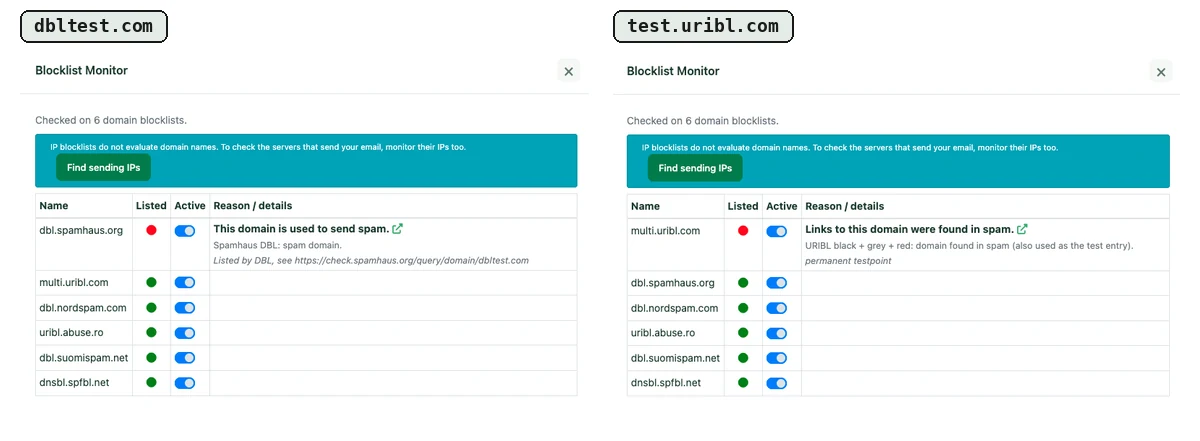
It doesn’t request removal for you: that stays with you and each list’s process. What it changes is the first hour: you learn about the listing from an alert that names the list, instead of from a forwarded bounce. Add the domains you send from and the ones that appear in your links, in your dashboard under Blocklist Monitor.
Create a free account to get started.
Related posts
- Inbox placement test: is your email going to spam at Gmail or Outlook?
- How to clean a 50,000-contact email list before a campaign
- Black Friday email marketing 2026: how to keep your emails out of spam
See all posts on the Easy Email Verification blog
Illustration by Storyset