
Black Friday 2026 falls on November 27, and Cyber Monday on November 30. On Black Friday, email marketing volume grows sharply. If you send to old lists or ramp up sends overnight, delivery problems can show up right when the campaign matters most. With the date approaching, most of these problems can still be fixed. Some can only be worked around.
Black Friday email marketing 2026: delivered, spam or rejected
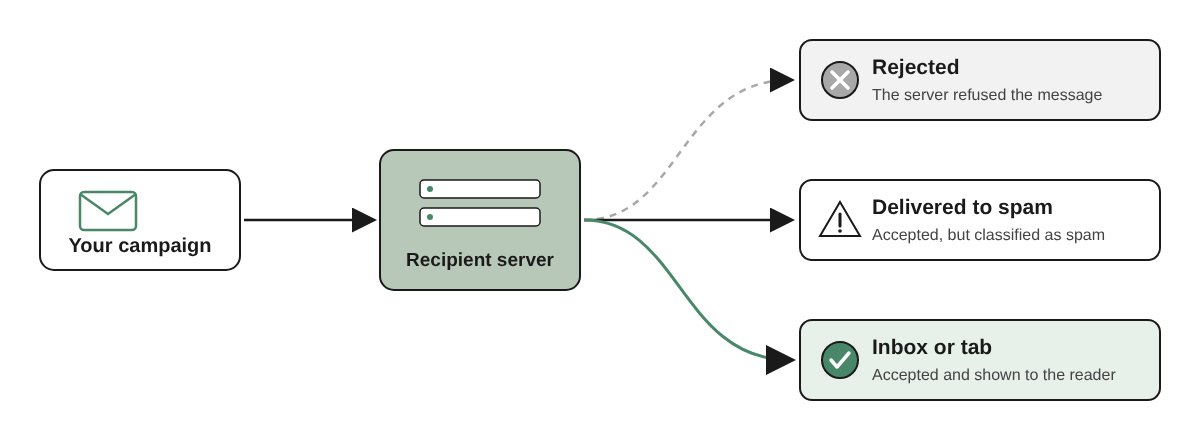
Before the calendar, it helps to separate three situations that are often treated as one:
- Rejected: the recipient’s server refused the message. It lands nowhere.
- Delivered to spam: the server accepted it but classified it as spam.
- Delivered to the inbox or a tab: what you want.
Since 2024, the big providers’ rules have raised the risk of the first case. A campaign that used to be accepted and sent to spam can now also be rejected for not meeting authentication requirements.
The rules are not the same everywhere:
- Gmail: every sender needs SPF or DKIM. Anyone sending close to 5,000 or more messages in 24 hours to personal Gmail accounts, counting everything sent from the same primary domain, is a bulk sender. Bulk senders need SPF and DKIM, a published DMARC record, one-click unsubscribe on marketing messages and a spam complaint rate below 0.3%. Google recommends staying below 0.1%. Since November 2025, Google has warned that non-compliant messages may be rejected. Details are in the Gmail sender guidelines.
- Outlook and Hotmail: since May 2025, domains sending more than 5,000 emails a day to outlook.com, hotmail.com and live.com must pass SPF, DKIM and DMARC. Microsoft chose to reject non-compliant messages.
What you can still do before Black Friday
| Still possible | Needs earlier preparation |
|---|---|
| Verify the list and separate invalid addresses | Fix authentication that was never set up, when it depends on another team or provider |
| Check that SPF, DKIM and DMARC pass on the campaign email | Change domain, IP or sending platform |
| Turn on one-click unsubscribe in your sending platform | Build reputation for much more volume than usual |
| Choose who gets the email first and cut the audience if needed | Safely re-engage a list that sat idle for months |
If your infrastructure isn’t ready, the safer path is a smaller audience, not multiplying volume the day before.
Start with the list
A high share of invalid addresses can hurt your sender reputation and waste part of your sends, and on Black Friday that happens exactly when volume is highest.
If the list has been idle for months, verify it before sending again. Prioritize older contacts, addresses that never received a campaign, and sign-ups that weren’t verified at entry. Bulk email verification separates invalid addresses from valid ones and flags those that need attention, such as catch-all domains. To decide what to do with each result, see what each email verification result means.
Verification doesn’t guarantee an address will still be valid on send day, and it doesn’t catch every abandoned mailbox. But a smaller, more reliable list usually does better than trying to reach everyone at once.
Check authentication on the real email
Send the campaign email to one of your own Gmail accounts, open “Show original” and check that SPF, DKIM and DMARC show PASS. It is a quick check to catch authentication failures before you send. It doesn’t guarantee delivery, but it helps you find problems that could compromise the campaign. If you use more than one sending platform, repeat the test for each. To keep track over time, a DMARC monitor shows which services send on behalf of your domain and whether they pass authentication.
An inbox placement test with seed mailboxes helps you see whether the email tends to land in the Promotions tab or in spam at each provider. It is a sample: the real result depends on your reputation with each recipient.
Choose carefully who gets it first
In the days before Black Friday, start with contacts who showed recent interest: they bought, clicked or signed up in the last few months. That limits sends to inactive contacts and lets you see how the campaign performs before you widen it.
Google Postmaster Tools shows your spam complaint rate at Gmail, but the data arrives with a delay and only appears when volume is high enough. It also says nothing about Outlook or Yahoo. Use it as a trend, not a real-time alarm.
Mistakes that hurt delivery on Black Friday
- Re-engaging an old list all at once after months without email.
- Buying lists to extend your reach.
- Raising frequency abruptly, from one email a week to one a day.
- Resending the same offer several times to people who didn’t engage.
- Changing domain, IP or sending platform close to the date.
After Cyber Monday
Split bounces by type. Hard bounces, from addresses that don’t exist, come off the list. Soft bounces, from temporary failures such as a full mailbox or an unavailable server, deserve a second look before any decision. Process unsubscribes: Gmail requires them to be honored within two days.
Is your list ready for Black Friday?
In Black Friday email marketing, a good offer isn’t enough: it has to go to addresses that can actually receive it. Before you send, verify your list with Easy Email Verification and find the contacts that are invalid or need attention.