
Your campaign went out, the platform says “delivered”, but the results came in below what you expected. Before you rework the subject line or the content, check three DNS records on your domain.
DMARC, DKIM and SPF help mailbox providers check whether a message is authorized to use your domain. They don’t prove the sender is trustworthy, but they make it much harder for someone else to send email in your name. Gmail, Yahoo and Outlook have tightened their rules for bulk senders, and depending on the provider and your volume, all three may be mandatory. This post explains what each record checks, shows the actual records on our own domain, and ends with a check you can run on yours in two minutes.
Table of Contents
DMARC, DKIM and SPF: three records, three different questions
The three are often listed together, but each one answers a different question for the receiving server.
| Record | The question it answers | Where it lives |
|---|---|---|
| SPF | Is this server allowed to send for the domain in the SMTP envelope? | TXT record on the domain |
| DKIM | Was this message signed by a domain, and is it unchanged? | TXT record at selector._domainkey.domain |
| DMARC | Do the SPF or DKIM results match the domain in “From”, and what should happen if they don’t? | TXT record at _dmarc.domain |
SPF (Sender Policy Framework) lists the servers and services allowed to send mail for a domain. It checks the return-path domain used in the SMTP envelope, which the reader never sees, not the “From” address. A spammer can pass SPF with their own domain and still put your brand in the “From” line.
DKIM (DomainKeys Identified Mail) is a signature. The sending platform signs each message with a private key, and the receiver checks it against the public key published in DNS for the signing domain (the d= value in the signature). If someone edits the message on the way, the signature breaks. DKIM also tends to survive forwarding, which SPF usually does not.
DMARC ties the other two to the visible “From” domain. To pass DMARC, only one of the two, SPF or DKIM, has to pass and check a domain aligned with the “From” domain; both don’t need to. By default, alignment is relaxed: domains that share the same organizational domain (for example, company.com and mail.company.com) count as aligned.
| From | DKIM d= | Aligned (default) |
|---|---|---|
company.com | company.com | Yes |
company.com | mail.company.com | Yes |
company.com | platform.com | No |
That second row is why many sending platforms ask you to set up a subdomain such as mail.company.com or em123.company.com. DMARC also tells receivers which policy you want applied to failures, and where to send daily reports.
What we found on our own domain
On November 13, 2026 we looked up the public records of easyemailverification.com, with the free email domain report and a direct DNS query. This is what was published that day:
SPF    v=spf1 include:secureserver.net include:emsd1.com include:zcsend.net ~all
DKIM   s1._domainkey → RSA public key (2048 bits)
DMARC  v=DMARC1; p=none; sp=none; rua=mailto:…@email-check.org; ruf=mailto:…; ri=86400; fo=1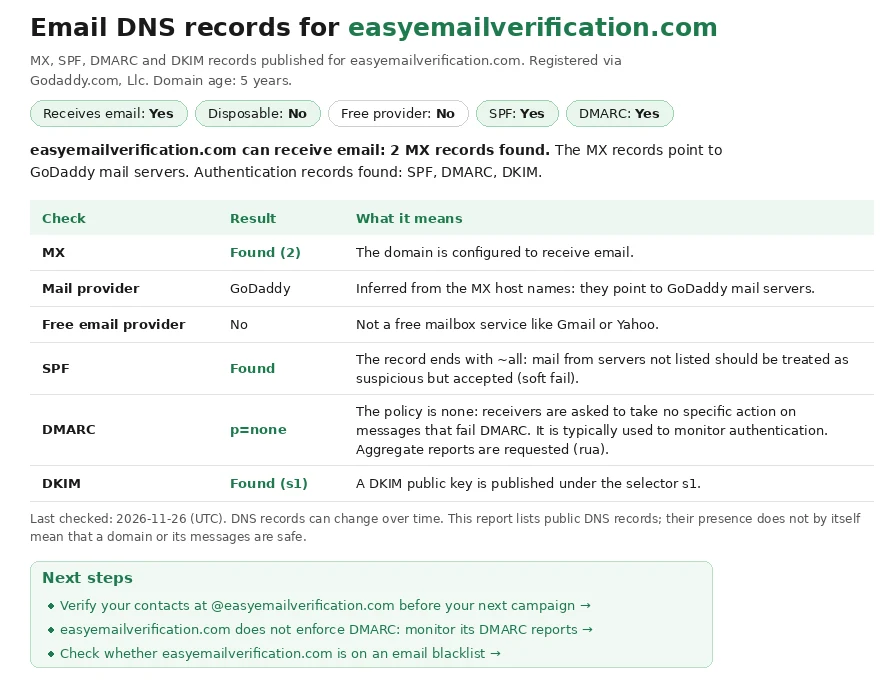
DNS records change, so treat this as a snapshot of the configuration on that date. It illustrates three common situations in email authentication.
The SPF record has three includes, but can take five lookups. During evaluation, SPF allows up to 10 mechanisms and modifiers that trigger DNS queries, counting nested includes. Going over produces a permanent error (permerror), which can make authentication fail (RFC 7208, section 4.6.4).
Evaluation stops at the first mechanism that matches the sending IP, so the count depends on which server sent the message. To measure the worst case, a server that matches nothing and forces a full read, we followed each include in DNS on November 13: secureserver.net points to spf-0.secureserver.net, which points to spf.protection.outlook.com, and the other two includes only list IP addresses. That’s 5 DNS-querying terms out of 10 allowed. Providers change their own records, so the number can grow without anyone touching our DNS.
DKIM was found under one selector. The s1 key points to our email sending service. A domain can have several DKIM keys with different selectors. DNS has no public list of selectors, so tools have to know or discover each name to look up its key. Finding s1 also doesn’t prove every sending service signs correctly: that only shows up in message headers or DMARC reports. If a report says “DKIM not found”, check the selector name in your sending platform before assuming it’s missing.
DMARC is at p=none. With p=none, you ask receivers to report DMARC failures without applying a DMARC-specific quarantine or reject. Receivers can still filter or reject messages for their own reasons. It meets the minimum Gmail and Outlook ask of bulk senders, and it’s the monitoring stage, not the protection stage. We come back to that below.
What Gmail, Yahoo and Outlook require
For personal Gmail accounts, Google asks every sender to authenticate with SPF or DKIM. Senders close to 5,000 messages a day need both, plus a DMARC record with at least p=none and alignment, according to the Gmail email sender guidelines. The sender guidelines FAQ says a missing DMARC record takes away delivery support and mitigation, and that the user-reported spam rate should stay below 0.1% and never reach 0.3%.
Yahoo asks all senders for SPF or DKIM and bulk senders for both, plus DMARC, in its sender best practices. Microsoft followed on May 5, 2025: domains sending more than 5,000 emails a day to Outlook.com, Hotmail.com and Live.com addresses must pass SPF, DKIM and DMARC, as announced on the Microsoft Tech Community blog.
Under 5,000 a day? Set up all three anyway. Providers filter smaller senders too, and authentication is one of the signals they use.
How to set up DMARC, DKIM and SPF on your domain
The exact screens depend on your DNS host (Cloudflare, GoDaddy, Route 53…), but the order is the same everywhere.
- List every service that sends as your domain. Email marketing, CRM, transactional email, your mailbox provider, help desk, billing. This list is the hard part.
- SPF: build one TXT record on the domain from the services that use your domain as their SMTP envelope sender. Some give you an
include:, some give IP addresses, and some use their own return-path domain and rely on aligned DKIM instead. Follow each provider’s instructions, count the nested lookups, and choose theallqualifier that fits your setup (~allwhile you’re still mapping senders is common). - DKIM: in each sending service, turn on domain authentication. It will give you a selector and a key (or a CNAME). Publish it exactly as given.
- DMARC: publish a TXT record at
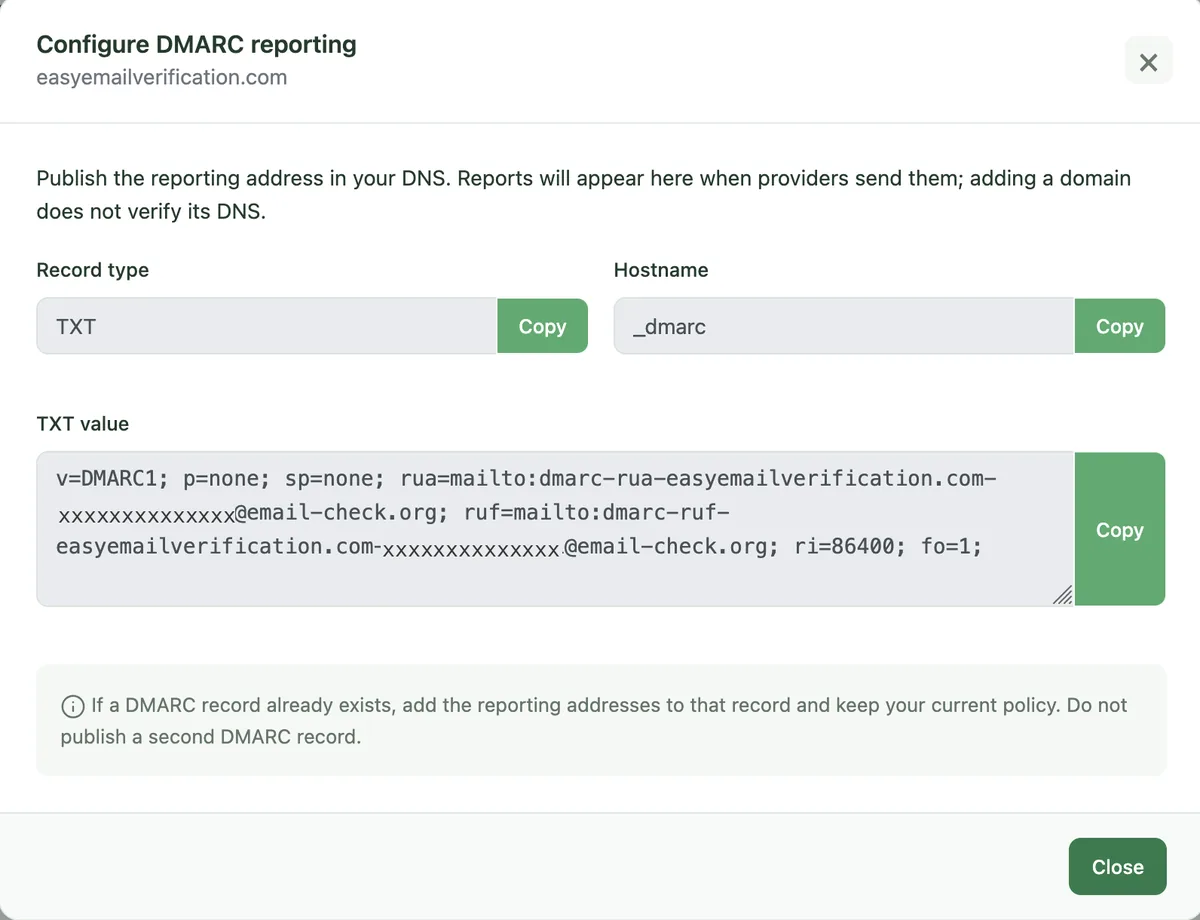
_dmarc.yourdomain.comwithv=DMARC1; p=none; rua=mailto:your-report-address. Use an address that someone, or a tool, will actually read. In the DMARC Monitor, you add the domain and it generates the record for you, with theruaaddress the reports go to, ready to copy into your DNS. If the domain already has a DMARC record, add the address to it instead of creating a second one. - Test: send a message to a Gmail address, open it, choose “Show original” and look for
SPF: PASS,DKIM: PASSandDMARC: PASS.
If the rua address is on a different domain from yours, that other domain has to authorize it by publishing a DNS record, or receivers won’t send the reports (RFC 7489, section 7.1). Our reports go to email-check.org, which publishes v=DMARC1 at *._report._dmarc.email-check.org for that reason. A monitoring service handles this on its side; you only publish your own DMARC record.
The mistakes we see most
- Two SPF records. A domain can have only one. A second
v=spf1record, usually added by a new tool’s setup guide, causes apermerror. Merge them into one line. - A platform that sends but isn’t in SPF and doesn’t sign with your domain. Common with CRMs, help desks and invoice tools. Each one needs to pass SPF with your domain or, better, sign DKIM with your domain or a subdomain of it.
- DKIM signed only with the platform’s domain. The signature passes, but with
d=platform.comit isn’t aligned with your “From”, so it doesn’t help DMARC. Look for “domain authentication” or “custom DKIM” in the platform’s settings. p=rejecton day one. It sounds safe. It can block your own invoices if the billing tool was never set up.- A DMARC record nobody reads. The
ruaaddress receives XML reports every day. If they go to an inbox no one opens, you never find the sender that’s failing.
From p=none to p=reject
For domains that already send through several services, p=none is usually the safest starting point for mapping legitimate sources. It isn’t the destination. While it’s in place, receivers don’t apply a DMARC policy to messages that fail, so it does little to stop someone spoofing your domain.
The criterion for moving on is coverage, not a date: stay at p=none until your reports include every legitimate sending service and show them passing DMARC consistently. Then move to p=quarantine, watch the reports for anything legitimate that starts failing, and move to p=reject once legitimate traffic passes consistently. As an example, a domain that sends every day might see all its sources within two weeks; a company with a monthly newsletter and quarterly billing runs needs to wait at least one full cycle of each.
A domain that sends no email at all, such as a new domain or a brand variation registered only for protection, doesn’t need this transition: it can go straight to p=reject, together with an SPF record of v=spf1 -all. It doesn’t need DKIM either, since there’s nothing to sign. First make sure no subdomain sends email, and add sp=reject so the policy covers subdomains too.
That is where many domains stop, because reading DMARC reports in XML takes work: each provider sends a file per day, listing the IPs that sent as the domain, the counts and the result of each check. The DMARC Monitor receives those files and turns them into a dashboard, and that’s how we follow our own domain. In the 30 days from October 14 to November 12, 2026, six providers reported 2,972 messages with easyemailverification.com in “From”: 94.7% passed DMARC and 159 did not.
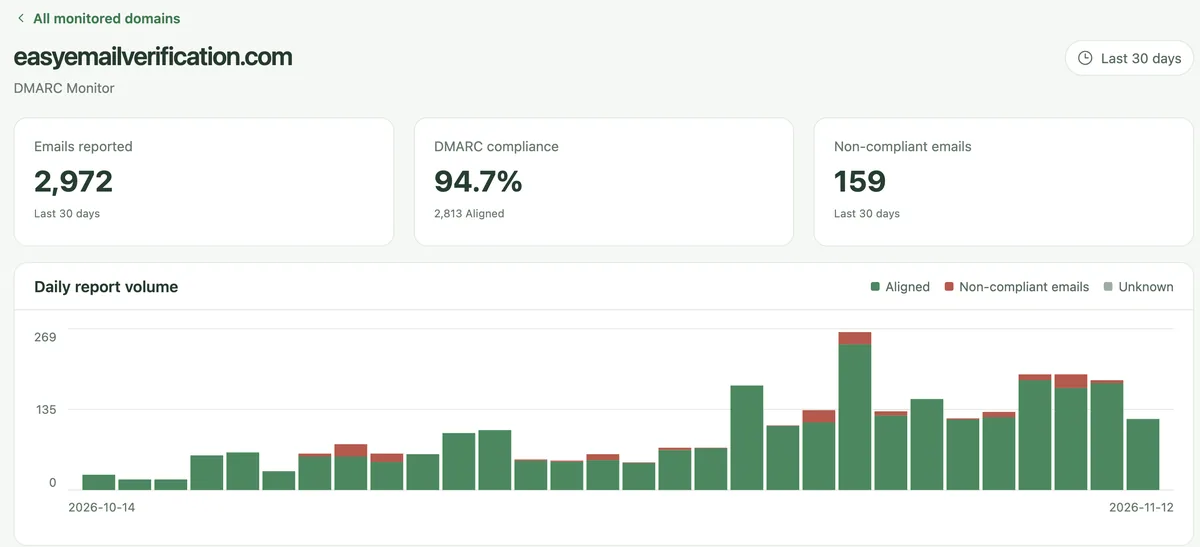
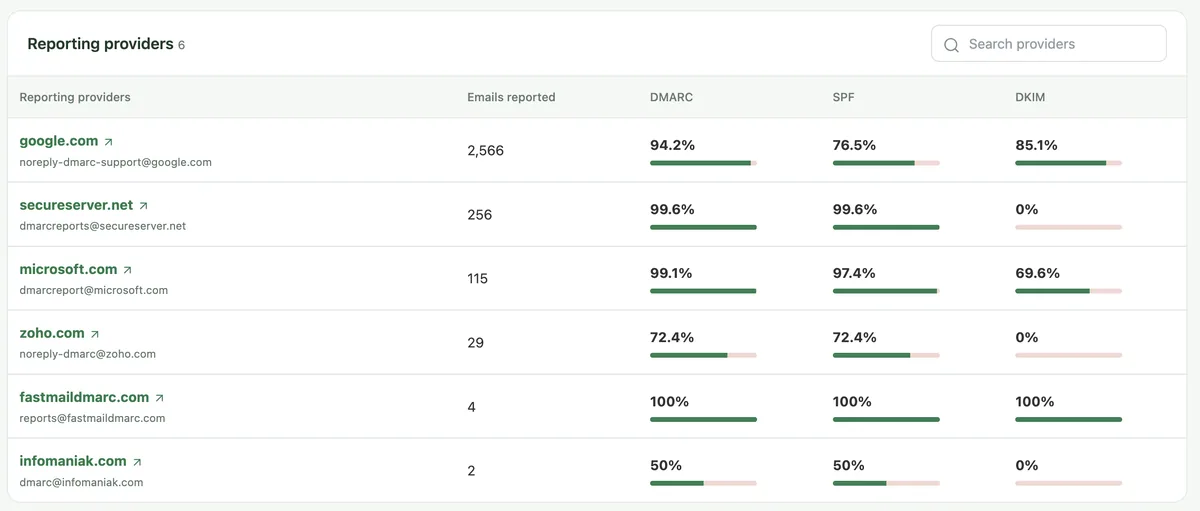
The per-provider table shows why one of the two is enough. In Google’s reports, SPF passed for 76.5% of messages and DKIM for 85.1%, but DMARC passed for 94.2%: many messages that failed one check passed the other.
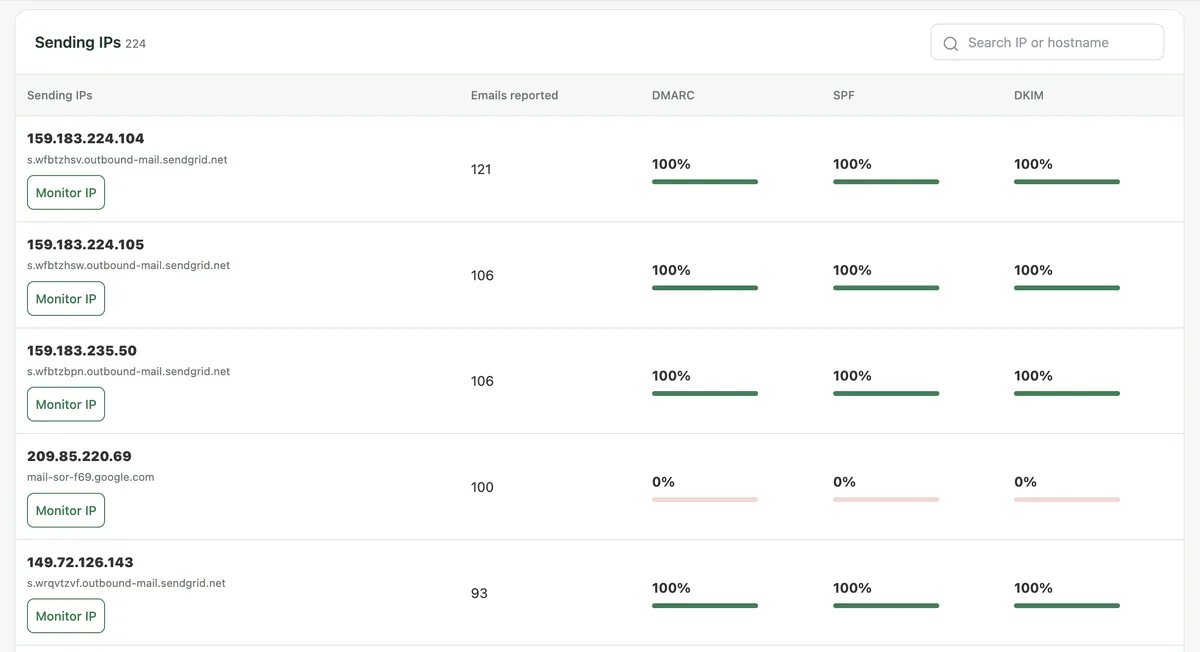
The IP list is where the things to investigate show up. Our sending service’s servers passed all three checks for 100% of messages. Right below them, a Google server (mail-sor-f69.google.com) sent 100 messages with our domain in “From” and failed all three. This pattern is common when messages are forwarded or when a Gmail account is set up to send as a company address. Until a source like this is identified, tightening the policy is risky: if it’s legitimate, those messages would start going to spam or being rejected.
Authentication is not the whole picture
SPF, DKIM and DMARC passing tells Gmail the message was authorized to use your domain. It doesn’t tell Gmail people want it, and it doesn’t make a message safe: if an attacker takes over a legitimate account, their email can pass all three checks. On the reputation side, a list with many invalid addresses can hurt the domain no matter how good the records are. Cleaning the list before a campaign is covered in how to clean a 50,000-contact email list.
Next step
Open the free email domain report, type your domain and look at three lines: SPF found, DKIM found, and the DMARC policy. If the domain has no DMARC yet, start by publishing the record with a rua address. If it’s already at p=none, follow the reports to see which services pass and which fail. The DMARC Monitor organizes that data and helps you decide when to move to a stricter policy. To check a single address before you send, use the free email checker.
Related posts
- Black Friday email marketing 2026: how to keep your emails out of spam
- What is bounce, and how to eliminate it from your email strategy?
- Email marketing in spam? Tips and solutions to avoid this problem
See all posts on the Easy Email Verification blog
Illustration by Storyset