
You uploaded a list to Easy Email Verification and got three email verification results back: valid, invalid and unknown. The first two are easy to read. The doubt usually shows up with unknown: should you verify again, or leave the address out of the next send? To decide, look at the reason. A server that was slow to answer is a different case from a domain that accepts any address.
Email verification results: the decision in one table
| What came back | What to do |
|---|---|
valid with safe_to_send: true |
Send. |
invalid |
Remove it from your sending list. If there is a did_you_mean suggestion, confirm the fix first. |
unknown from a temporary failure (timeout, no_connect, temporarily_blocked, unavailable_smtp, unexpected_error) |
Verify again later. These answers don’t use a credit. |
unknown from accept_all (catch-all domain) |
Verifying again won’t help: the answer will be the same. Decide based on the contact’s history. |
The rest of this post explains each row with a test.
The test
We ran five addresses through the checker on November 10, 2026. These are the email verification results:
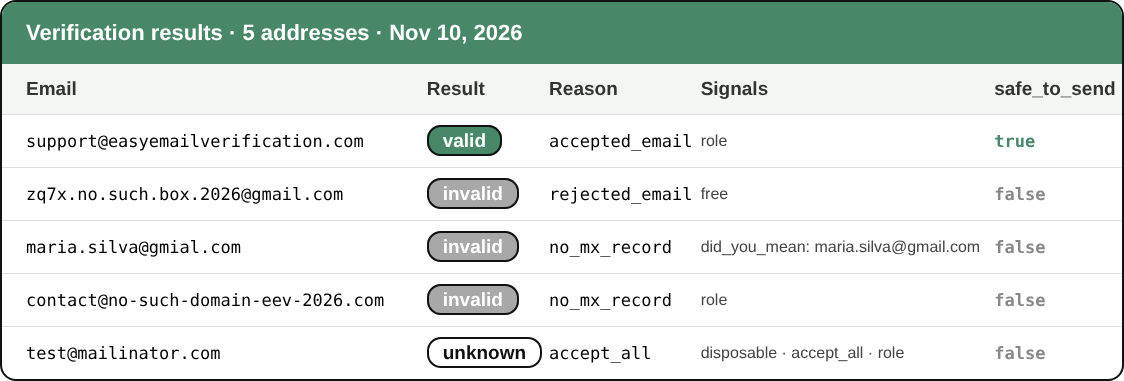
| Address | Result | Reason | safe_to_send |
|---|---|---|---|
| support@easyemailverification.com | valid | accepted_email | true |
| zq7x.no.such.box.2026@gmail.com | invalid | rejected_email | false |
| maria.silva@gmial.com | invalid | no_mx_record | false |
| contact@no-such-domain-eev-2026.com | invalid | no_mx_record | false |
| test@mailinator.com | unknown | accept_all | false |
None of them hit a timeout in this test. That case is more common in large lists, with slow corporate servers or servers that ask you to try later.
Valid: the server accepted the address
valid with the reason accepted_email means that, during the check, the domain’s mail server accepted that recipient. The check stops before any message is sent, so the person receives nothing.
Before you send, also look at safe_to_send. It is true only when the address is valid and no risk signal argues against it. In the test, support@easyemailverification.com is valid and safe, even though it is a team address.
Invalid: remove it from your sending list
invalid means the address can’t receive email right now. Sending to addresses like this causes bounces, and too many bounces hurt your reputation with Gmail and Outlook. We cover that in our post on bounces.
The reason shows what failed:
rejected_email: the domain receives email, but its server refused this mailbox. That is what Gmail answered for the zq7x address.no_mx_record: the checker found no MX record for the domain. That was the case for gmial.com and for the made-up domain.invalid_domainandinvalid_email: the domain doesn’t exist, or the address is badly written.exceeded_storage: the mailbox is full. Often it is an abandoned mailbox, but it can be temporary. If the contact matters, verify it again in a few weeks.
For maria.silva@gmial.com, the response also brought did_you_mean: maria.silva@gmail.com. It is a suggestion, not an automatic fix. If you can, confirm with the contact and verify the corrected address. Finding a valid mailbox at gmail.com doesn’t prove it belongs to the same person.
Unknown: check the reason before you decide
unknown means the check couldn’t reach a reliable answer. There are two very different cases.
Temporary failure. With timeout, no_connect, temporarily_blocked (greylisting), unavailable_smtp or unexpected_error, the server was slow, refused the connection or asked to try later. The doubt is about the moment, not the address. Verify again later. These answers don’t use a credit.
Catch-all domain. With accept_all, the server says yes to any address at the domain, whether the mailbox exists or not. That is why EEV returns unknown with safe_to_send: false. Verifying again gives the same answer, and that check uses a credit, because the server did answer.
Our take: don’t delete catch-all addresses, especially in B2B lists, where many of them are real. Put them in a separate segment and decide based on what you already know about the contact: a sign-up confirmed by email, a past reply, a purchase.
For the ones with no history, send in small batches and watch the bounce rate before you widen the send. You can test whether a domain is catch-all with the free catch-all domain test.
The risk signals
Besides the result, the response carries true/false fields. They are signals, not verdicts.
- disposable: the address belongs to a temporary email service, like the mailinator.com address in the test. It may stop working right when you need to reach the person again. In sign-up forms, it is worth blocking. The disposable email checker tests a single address for free.
- role: the address belongs to a team or function, such as info@, sales@ or support@. It often works fine in B2B, but several people read the same mailbox and complaint rates tend to be higher. Keep it if it is a customer; think twice before adding it to a newsletter.
Email verification results change over time
A verification shows the state of the address at that moment. An address that is valid today may be gone next month: people change jobs, companies shut down mailboxes, idle free accounts get deleted. In B2B lists this happens faster.
That is why it pays to verify again before a big send if the list is more than three months old, and to verify new contacts when they sign up. The second part can be automated with the API or with integrations like ActiveCampaign, Mautic and Zapier, listed on the integrations page.
Verify your list
Upload your file to bulk email verification and you get, for every address, the same email verification results covered in this post: result, reason, signals and safe_to_send. To test a single address, use the free email checker.
Related posts
- What is bounce, and how to eliminate it from your email strategy?
- Email marketing in spam? Tips and solutions to avoid this problem
- How to build effective mailing lists
See all posts on the Easy Email Verification blog
Featured illustration by Storyset.