
Email Checker – Verify an Email Address
Check whether an email address can receive mail before you send: syntax, domain, MX and SMTP mailbox checks (no email is sent), plus catch-all, disposable and role-based detection.
Up to 5 free checks without an account · 50 verifications per day with a free account
What Is an Email Checker?
An email checker tests whether an email address can receive mail before you send to it. The Easy Email Verification checker runs syntax, domain, MX and SMTP mailbox checks without sending an email, and flags catch-all, disposable, role-based and free-provider addresses.
Address
- Syntax validationChecks that the address follows email format rules (RFC).
- Typo suggestionReturns a correction in
did_you_meanwhen a likely typo is detected.
Domain and mail server
- Domain validationChecks that the domain exists.
- MX record verificationFinds the mail servers that receive email for the domain.
- Mail server connectivityConnects to the domain's mail server.
Mailbox
- SMTP mailbox verificationAsks the mail server whether the mailbox exists — without sending an email.
- Catch-all detectionIdentifies domains that accept email for any address (
accept_all).
Address type
- Disposable email detectionIdentifies temporary email services.
- Role-based detectionIdentifies addresses such as info@, sales@ or support@.
- Free provider detectionIdentifies addresses on free services such as Gmail, Yahoo or Hotmail.
Limitations
Mailbox verification is performed without sending an email. Some mail servers may not disclose mailbox existence or may temporarily block verification. In these cases, the result may be returned as Unknown. Addresses on catch-all domains cannot be confirmed individually, and a verification result is not a guarantee that a future message will be delivered.
How to Read Your Result
Each check returns a result — valid, invalid or unknown — and a reason that explains it.
| Result | What it means | Suggested use |
|---|---|---|
valid | The address passed the applicable verification checks and the mailbox was accepted by the remote mail server. | Keep it for sending. Also review flags such as role, accept_all and disposable. |
invalid | The address failed validation or the remote mail server rejected the mailbox. | Remove it from your list or ask the person to correct it. |
unknown | The verification could not reach a reliable conclusion, for example because of a timeout, temporary blocking, SMTP unavailability or other remote mail server behavior. | Do not treat it as invalid. Keep it apart and verify it again later. |
Unknown does not mean invalid.
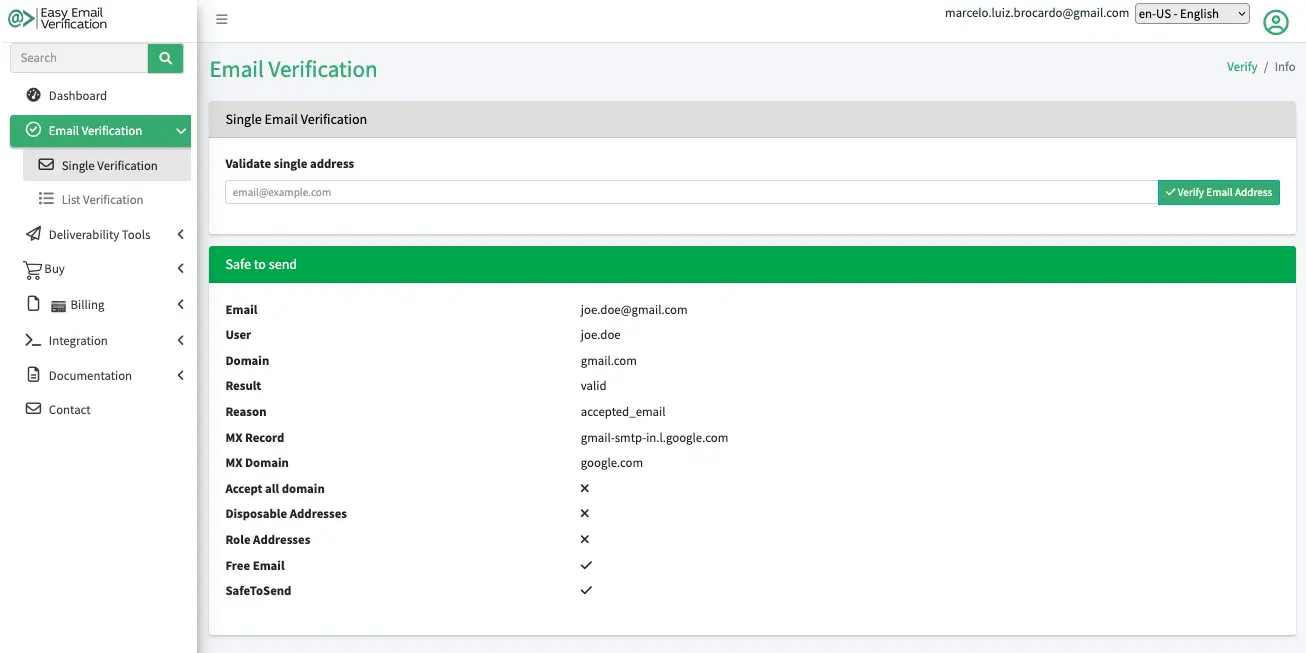
Reasons
| Reason | Description |
|---|---|
invalid_email | The email syntax is invalid (not according to RFC standards). |
invalid_domain | The domain of the address does not exist. |
rejected_email | The SMTP server rejected the address: the account does not exist on the receiving server. |
accepted_email | The SMTP server accepted the address. |
no_connect | Could not connect to the receiving SMTP server. |
timeout | The session timed out because the receiving mail server responded too slowly. |
unavailable_smtp | The receiving SMTP server was not available to process the request. |
unexpected_error | An unexpected error occurred on the receiving SMTP server. |
no_mx_record | The domain has no MX record. |
temporarily_blocked | The address is temporarily greylisted. |
exceeded_storage | The account on the receiving server has exceeded its storage allocation. |
Useful fields
| Field | Description |
|---|---|
disposable | The address belongs to a disposable (temporary) email service. |
accept_all | The domain appears to accept email for any recipient (catch-all), so the mailbox cannot be confirmed. |
role | Role-based address such as info@, sales@ or support@. |
free | The address is hosted by a free email provider. |
safe_to_send | Whether the verification logic considers the address safe to send to. |
did_you_mean | A suggested correction when a likely typo is detected. |
mx_record | The mail exchanger identified during verification. |
How the Email Checker Works
Email Checker: Email Verification & Deliverability – Clean Your List and Avoid Bounces · YouTube may use cookies
Need to Verify More Than One Address?
Bulk email verification
Upload a CSV or TXT file to verify an entire email list. Lists are processed asynchronously: follow the status and download the results when they are ready. Result files are kept for 30 days and then deleted.
The Bulk API follows the same flow: upload, status, list, download and delete.
Clean a whole list before your campaignEmail verification API
A REST API that returns JSON, for real-time email validation in signup forms, apps and CRMs. HTTP status codes identify issues such as an invalid API key (401), exhausted quota (402) or rate limiting (429).
Read the API documentationIntegrations
Verify contacts where they already are, through official integrations or Zapier.
See All IntegrationsWant to see how a whole domain is configured for email instead of a single address? Open a domain report with its MX, SPF, DMARC and DKIM records — for example: example.com
Simple, Transparent Pricing
Free Forever
$0
Verify up to 50 email addresses every day for free. No credit card required. The free plan does not expire. A free account is required.
Pay-as-You-Go
From US$ 4 for 500 verifications. Buy only the credits you need — credits never expire.
Email Checker FAQ
Is an email sent to the address during verification?
No. Mailbox verification is performed over SMTP without sending an email.
Does “unknown” mean the address is invalid?
No. Unknown means the verification could not reach a reliable conclusion — for example because of a timeout, temporary blocking (greylisting) or an unavailable mail server. You can verify the address again later.
What is a catch-all (accept-all) domain?
A domain whose mail server accepts messages for any address. Because every address is accepted, individual mailboxes on these domains cannot be confirmed; the API reports this with accept_all.
What does “safe to send” mean?
safe_to_send indicates whether the verification logic considers the address safe to send to. Review it together with the other flags: a role-based address such as info@ can be valid and still be one you prefer not to include in a campaign.
How many addresses can I check for free?
You can run up to 5 checks without an account. With a free account you can verify up to 50 email addresses every day — no credit card required, and the free plan does not expire.
Can I verify a whole list of emails?
Yes. Upload a CSV or TXT file for bulk email verification in your account, or use the Bulk API (upload, status, list, download and delete). Lists are processed asynchronously and result files are kept for 30 days.
Do you store the email addresses I verify?
Addresses verified one at a time — in the email checker or through the API — are not retained. For bulk verification, result files are kept for 30 days so you can download them and are then deleted. Account data (name, email and credentials) is stored to provide the service.
Start Verifying Emails for Free Today
Create your free account and verify up to 50 email addresses per day. No credit card required.
Create your free account