
Home / Email Scoring
Email Scoring: test your email before the campaign goes out
Send a message to a unique test address and get a diagnosis of authentication, content and sending configuration, with what to fix first.
Works with any email provider or sending platform.
What is email scoring?
Email scoring analyzes a real message the way a receiving server would, and summarizes the result in a score and a list of checks. It shows problems you can fix before sending, such as failed authentication or content that spam filters tend to penalize.
Authentication
Shows whether SPF, DKIM and DMARC are working for the message you sent.
Content
Points out what spam filters tend to penalize in the message.
Sending setup
Checks items such as blacklists and unsubscribe headers.
How Email Scoring works
You test the real message, from the same platform you will use for the campaign, so the result reflects what providers will receive.
Create a test address
Generate a unique address for this test.
Send your message
Send to that address from your usual provider or platform. New messages are checked every minute.
Review the diagnosis
See the score, each check and what needs attention.
See it in the dashboard
Create a test address and follow the score of each message you sent. Sample data.
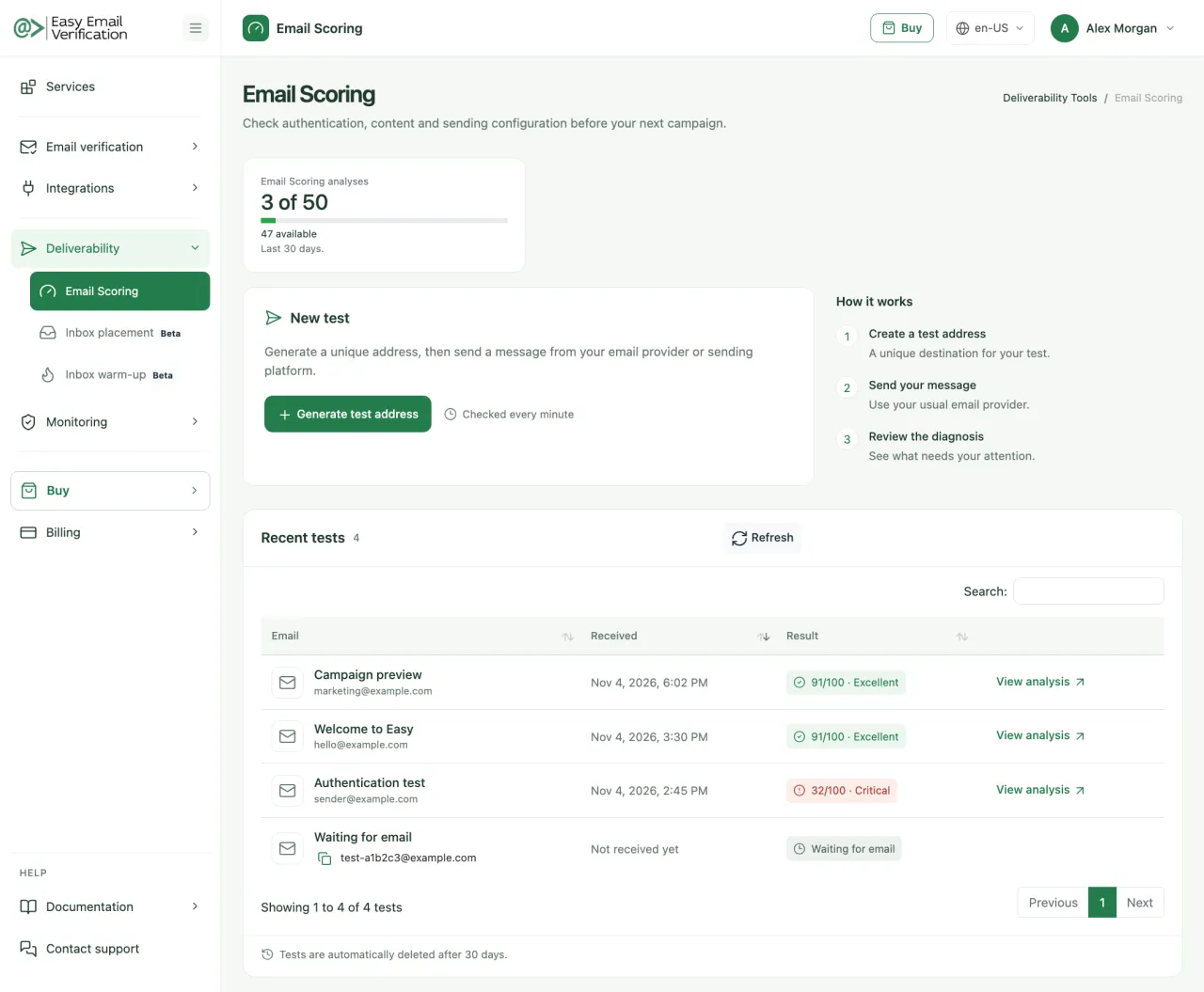
What you get
A score for each test
Compare versions of a message before choosing which one to send.
Authentication checks
See the results of SPF, DKIM and DMARC for the message received.
Content analysis
Find what spam filters may penalize in the content.
Blacklist check
Know whether your sending IP or domain appears on a blacklist.
Advice on what to fix
Each problem comes with a suggested next step.
Recent test history
Return to recent tests at any time. Tests are deleted automatically after 30 days.
Watch: email scoring explained

In this video, you will see how email scoring helps to:
- find problems before sending
- understand what affects deliverability
- improve your next campaign
Prefer to listen? Hear it on Spotify
How to read your result
Start with authentication: it is usually the most important fix, and often the quickest.
| Check | If it fails | What to do |
|---|---|---|
| SPF | The sending server is not authorized for your domain. | Add your platform to the domain’s SPF record. |
| DKIM | The message is not signed, or the signature does not validate. | Turn on DKIM in your sending platform and publish the key in DNS. |
| DMARC | Providers have no policy for your domain. | Publish a DMARC record, starting with p=none, and follow the reports. |
| Blacklists | The sending IP or domain is listed. | Find the cause, then request removal or ask your platform for a clean IP. |
| Content | Filters may penalize the text, links or images. | Review the items flagged in the analysis and test again. |
Deliverability Tools
Choose the best plan that fits your needs.
Basic
$49 / month
- 50 Email Scoring per month
- 50 Inbox Placement Tests per month
- 10 Blacklist Monitors per month (scanned every 12 hrs)
- 2 DMARC Monitor Domains per month
- 1 Google Postmaster Domain
- 50 Inbox Warm-up interactions per day
Advanced
$99 / month
- 100 Email Scoring per month
- 100 Inbox Placement Tests per month
- 20 Blacklist Monitors per month (scanned every 10 hrs)
- 5 DMARC Monitor Domains per month
- 3 Google Postmaster Domains
- 250 Inbox Warm-up interactions per day
Premium
$249 / month
- 500 Email Scoring per month
- 500 Inbox Placement Tests per month
- 50 Blacklist Monitors per month (scanned every 8 hrs)
- 20 DMARC Monitor Domains per month
- 10 Google Postmaster Domains
- 750 Inbox Warm-up interactions per day
Enterprise
$499 / month
- 1,500 Email Scoring per month
- 1,500 Inbox Placement Tests per month
- 250 Blacklist Monitors per month (scanned every 4 hrs)
- 250 DMARC Monitor Domains per month
- 50 Google Postmaster Domains
- 2,500 Inbox Warm-up interactions per day
Email Scoring FAQ
-
What is email scoring?
It is a test that analyzes a message you send and returns a score with the authentication, content and configuration checks behind it.
-
Does a high score guarantee the inbox?
No. The test helps identify problems, but delivery also depends on your reputation and on how recipients engage. To see where a campaign really lands, use the Inbox Placement Test.
-
Do I need to change my sending platform?
No. You send the test from the platform you already use.
-
How long does a result take?
New messages are checked every minute, so the analysis usually appears shortly after the message arrives.
-
How often should I test?
Before important campaigns, and whenever you change the template, the sending platform or the DNS configuration.
-
How long are tests kept?
Tests are deleted automatically after 30 days.
-
Which plans include it?
All deliverability plans. The number of analyses depends on the plan.
Related services
Fix the problems before your campaign goes out
Create a test address and analyze your next email.
Test an email