
Home / Blacklist Monitor
Blacklist Monitor: know when your domain or IP is listed
We check your domains and sending IPs against email blacklists on a schedule and alert you by email, so you can act before a listing hurts your campaigns.
Add a domain or IP, choose who receives the alerts and you are done.
What is an email blacklist?
An email blacklist, or blocklist, is a list of IP addresses and domains associated with spam or abuse. Mailbox providers and spam filters consult these lists when deciding what to do with a message, so a listing can send your email to spam or get it rejected, even when your content is fine.
IP blacklists
List the server addresses that send email. They affect everyone using that IP, which matters on shared sending infrastructure.
Domain blacklists
List domains found in spam messages or links. They follow your domain even if you change sending platform.
Why monitoring matters
Listings can happen without warning. Finding out early shortens the time your campaigns are affected.
How blacklist monitoring works
You choose what to watch and who should be told. The monitor repeats the checks automatically.
Add a domain or IP
Register what you want to monitor, such as your sending domain and IPs.
Choose who gets alerts
Enter the email addresses that should be told when something changes.
Follow the status
Scans run automatically, and you can open the details of each monitor at any time.
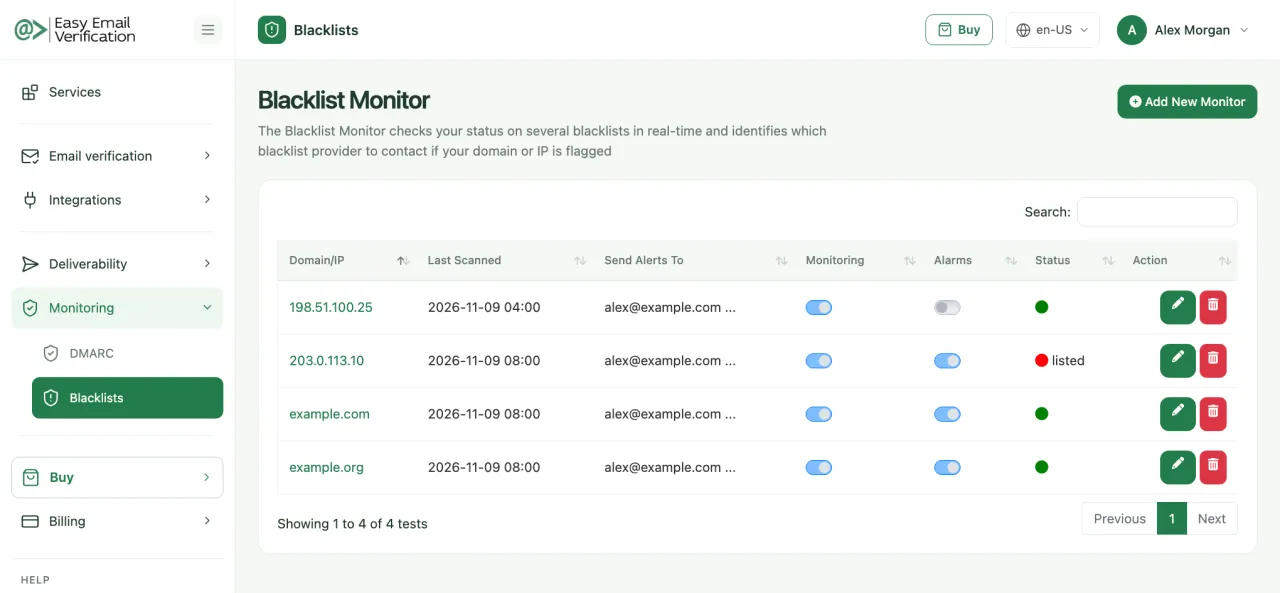
See it in the dashboard
Every monitored domain and IP in one list, with the last scan, alerts and status. Sample data.
What you get
Domains and IPs
Monitor both your sending domains and your IP addresses.
Automatic scans
Checks run on a schedule: every 12, 10, 8 or 4 hours, depending on the plan.
Email alerts
The addresses you choose are told when a monitored item is listed.
Status at a glance
See at once what is clean and what is listed.
Details per monitor
Open a monitor to see its results and links to more information.
Activate or pause
Keep each monitor active only while you need it.
Watch: email blacklists explained

In this video, you will see how blacklist monitoring helps to:
- identify listings of your domain and IP
- protect your sender reputation
- keep your campaigns performing
Prefer to listen? Hear it on Spotify
What to do if you are blacklisted
A listing is fixable. Find the cause first, because a removal request without a fix tends to end in a new listing.
| Situation | What it usually means | What to do |
|---|---|---|
| IP listed | The server sent spam-like traffic, or shares reputation with others. | Ask your sending platform for a clean IP, then follow the list’s removal process. |
| Domain listed | The domain appeared in spam messages or links. | Find the source, secure your accounts and sending, then request removal. |
| Listed after a campaign | The list may include old or purchased addresses. | Verify the list, remove inactive contacts and only then send again. |
| Not listed | No action needed on the monitored lists. | Keep monitoring, and check placement and authentication if results still drop. |
Deliverability Tools
Choose the best plan that fits your needs.
Basic
$49 / month
- 50 Email Scoring per month
- 50 Inbox Placement Tests per month
- 10 Blacklist Monitors per month (scanned every 12 hrs)
- 2 DMARC Monitor Domains per month
- 1 Google Postmaster Domain
- 50 Inbox Warm-up interactions per day
Advanced
$99 / month
- 100 Email Scoring per month
- 100 Inbox Placement Tests per month
- 20 Blacklist Monitors per month (scanned every 10 hrs)
- 5 DMARC Monitor Domains per month
- 3 Google Postmaster Domains
- 250 Inbox Warm-up interactions per day
Premium
$249 / month
- 500 Email Scoring per month
- 500 Inbox Placement Tests per month
- 50 Blacklist Monitors per month (scanned every 8 hrs)
- 20 DMARC Monitor Domains per month
- 10 Google Postmaster Domains
- 750 Inbox Warm-up interactions per day
Enterprise
$499 / month
- 1,500 Email Scoring per month
- 1,500 Inbox Placement Tests per month
- 250 Blacklist Monitors per month (scanned every 4 hrs)
- 250 DMARC Monitor Domains per month
- 50 Google Postmaster Domains
- 2,500 Inbox Warm-up interactions per day
Blacklist Monitor FAQ
-
What is blacklist monitoring?
It is the automatic, repeated checking of your domains and IPs against email blacklists, with an alert when a listing is found.
-
Are IP and domain blacklists different?
Yes. IP lists concern the server that sends the email, while domain lists concern the domain in the message or its links. It is worth monitoring both.
-
How often are the checks?
Every 12, 10, 8 or 4 hours, depending on the plan.
-
Do you remove me from a blacklist?
No. Each list has its own removal process. The monitor shows the listing and alerts you, and the guide above explains how to approach it.
-
Does a listing always mean my email is blocked?
No. Each provider decides how much weight to give each list, but a listing is a risk worth investigating.
-
Which plans include it?
All deliverability plans. The number of monitors and the scan frequency depend on the plan.
Related services
Find out about a listing before your campaign does
Add your domain or IP and start monitoring.
Start monitoring